
Most owners assume the worst thing that can happen to a Google Business Profile is a suspension.
There is something quieter that happens first, and it is easier to do. Someone who is not you can tell Google your business has permanently closed. Google can act on that. And unless you are in the habit of checking your own profile, you will not find out until the phone stops ringing.
I worked one of these earlier this year. I want to walk through it, because the part that surprised me was not the closure. It was what happened two weeks after I got the profile back.
The business is anonymous here for obvious reasons.
What happened
The owner is a solo operator. Verified their profile years ago, and then never looked at it again — which is the single most common thing I see, and on its own it is usually harmless.
What was not harmless was a dispute. A client did not pay. The owner believed that client was connected to a competitor. Rather than write off the invoice or negotiate, the owner escalated to litigation. I do not know every detail of that fight and it is not really the point.
The point is what one of those two parties did next.
Either the former client or the competitor reported the business as permanently closed — on Google, and on Yelp.
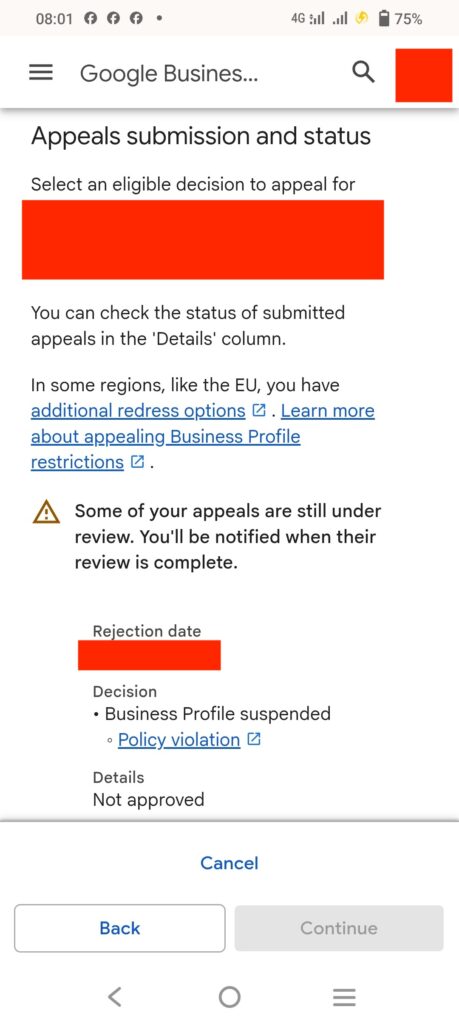
The owner never saw it. Weeks passed. Then Google suspended the profile, and the suspension notice is how they learned any of it had happened.
They appealed, following Google's instructions as written. The appeal included no verification documentation, because nothing in the process made clear that it should. It went nowhere.
By the time another local SEO practitioner referred them to me, the profile had been down for months and the owner was frightened about paying their bills. They were not easy to work with at that point. I would not have been either.
Here is what the work actually looked like:
- I investigated the listing and worked out what had happened and in what order.
- I directed the owner through recording their own verification video — what to film, in what order, and what had to be visible.
- I gathered their business license and supporting documentation.
- I submitted an appeal. It was denied. The case had sat untouched too long.
- For roughly 45 days I submitted repeated Google Support tickets and formal reinstatement requests.
- Google reinstated the profile.
Six weeks of persistence on a problem the owner did not cause. That is the real cost of not watching your own listing.
The part I did not expect
Two weeks after reinstatement, the owner logged in — something I had asked them to start doing, and had shown them how to do, adding photos and posting updates.
The business was marked permanently closed again.
I ran a listing search across the web. The Google profile had been restored. The Yelp listing was still flagged as closed. Nobody had gone back and fixed it, because nobody had thought to look.
We updated the hours, re-verified with Yelp, and it has been stable since. No second suspension that time — just the closed status.
[SCREENSHOT: Yelp listing showing closed status — anonymized]
What I know, and what I am deducing
I want to be precise about this, because a lot of what gets written about Google suspensions is stated with a confidence nobody has earned.
What I know, because I did it and watched it happen:
- The business was reported permanently closed on both Google and Yelp by a third party.
- The profile was suspended, and the owner found out from the suspension.
- The first appeal, submitted without documentation, failed.
- My appeal, submitted with a verification video and a business license, was also denied.
- Roughly 45 days of support tickets and formal reinstatement requests got it back.
- Two weeks later the Google profile showed permanently closed again, while the Yelp listing was still flagged closed.
What I am deducing, and cannot prove:
Why it closed the second time. There are two explanations and I do not know which is correct. Either someone reported it again, or Google picked up the closed status from the Yelp listing that nobody had corrected.
I lean toward the second, because of the timing and because the Google profile had just been restored through a manual review. But that is a professional read built on the suspension and verification cases I have worked directly with Google Support — not a fact, and not something Google has confirmed.
One more thing worth saying plainly: Google changes this stuff constantly. What behaved one way in my last case can behave differently in the next. Anyone telling you they know exactly how Google's closure and suspension systems work is guessing with more confidence than I am.
What Google's own documentation says, and what it leaves out
Google publishes guidance on marking a business as closed. It covers how an owner closes a location and how to reopen one. It explicitly acknowledges that profiles can be "mistakenly marked permanently closed" and provides a path to reopen them.
What it does not explain is how that mistake happens, or who is able to cause it.
That gap is not a small thing. Google documents the fix while leaving the cause undocumented, which means owners have no published reason to think a stranger's edit is a risk they should monitor. In my experience it is one of the easier ways to do real damage to a business you do not like, and very few owners have any idea it exists.
Source: Mark your business as closed — Google Business Profile Help
What this actually means for your profile
Three things come out of this case that apply whether or not you have an enemy.
Your Google profile's health depends on listings you are not looking at. Most advice frames NAP consistency — name, address, phone matching across the web — as a ranking chore. This case says it is also a risk problem. A stale, wrong, or hostile entry on another platform is not only a citation issue. It can follow you home.
Not checking your profile is the vulnerability, not the mistake. The owner did nothing wrong on their profile. They simply were not watching it. Every step of what followed was made worse by delay: the closure went unseen, the suspension went unseen, the appeal sat too long to be easy, and the second closure would have gone unseen too if I had not asked them to start logging in.
Anyone can edit your business information, and some of them are not on your side. Suggested edits, questions and answers, photos — your profile is a public surface. Google gives the public a voice in it, and that includes people you have upset.
Which leads to the uncomfortable one. How you treat the customers you do not like is a profile risk. I am not moralizing. I have watched a business dispute turn into a closed listing, a suspension and six weeks of my time. Not every difficult customer will do this. It only takes one who will.
Record your verification video before you need it
This is the cheapest thing in this article and the one I would actually do tonight.
Record a single continuous video, on your phone, showing:
- The street sign and the building number
- You unlocking the door at your business address
- A walk through the workspace
- Your equipment, with branding visible where it exists
- Anything that ties the business to you as the person authorized to run it
Then save it somewhere you can find it.
If you are ever asked to verify — or suspended and asked to prove the business is real — you are not scrambling to stage something while your phone is not ringing. You already have it.
My read, not Google policy: Google responds well to vivid, street-level footage that shows a real place and a real person. That is based on the cases I have worked, not on anything Google publishes. Google does not document what makes a verification video succeed, which is exactly why so many get rejected with no explanation.
If you are a service area business working out of a truck and a home office, the standard advice does not apply to you cleanly, and the video has to be planned differently.
Why does Google say my business is permanently closed?
Short answer, because this is the question most people arrive with.
There are four causes, and they need different responses:
- Someone on your side marked it closed — you, a staff member, or a previous marketer. Most common, easiest to undo. Reopen it from your profile.
- A member of the public submitted an edit saying you had closed. Google acknowledges profiles can be mistakenly marked closed, and provides a way to reopen them.
- Another listing says you are closed, and the wrong status followed you to Google. This is the one almost nobody checks.
- The profile is suspended, and the closed status is a symptom rather than the problem.
If your business says permanently closed on Google and you did not close it, work through those in order. Three and four are where owners get stuck, because the fix is not on the Google profile at all.
[EMBED HERE: "Your profile says permanently closed — what now?" decision tool — paste into a Divi Code module at this position]
If this is happening to you right now
In rough order:
- Check your Google profile today. Not your website, not your reviews — the profile itself. Status, hours, categories, address.
- Search your business everywhere else. Yelp, Apple Maps, Bing Places, Facebook, your trade directories. If Google says you are open and another platform says you are closed, fix the other platform too. That is the lesson of this case.
- Do not appeal empty-handed. A bare appeal is what the owner filed first, and it went nowhere. Documentation first.
- Do not let it sit. The single factor that made this case hard was time. Months of delay turned a fixable problem into six weeks of escalation.
- Keep a record of everything you submit. Dates, ticket numbers, what you sent. You will need it, because you will be submitting more than once.
When this stops being something you can fix yourself
Most profile problems are maintenance. Wrong category, stale hours, no recent photos, reviews going unanswered — an owner can handle all of that, and should.
This was not that. This was a third party, a denied appeal, and 45 days of escalation with a support process that does not explain itself. There is no guide that gets you through that, because Google does not publish the rules you would need.
If your profile is down right now, or you are looking at an appeal you have already lost, the useful first step is working out whether what you have is fixable or structural — before you spend six weeks finding out the hard way.
Run the profile risk check → It takes two minutes, asks for no email, and it will tell you if you should be handling this yourself.