
Most of what a Google Business Profile needs, you can do yourself. It is not complicated work and it does not take long. It just has to actually happen, on a schedule, instead of once at setup and never again.
This is the maintenance guide. What needs doing, how often, and which parts genuinely matter. Google renamed the product from Google My Business to Google Business Profile years ago, but almost everyone still calls it GMB, so both names appear here.
At the end there is a short list of things that are not maintenance problems. If one of those describes your situation, no amount of posting photos is going to fix it, and it is worth knowing that before you spend six weeks finding out.
What is the best way to manage Google My Business?
Treat it as a small recurring chore rather than a project.
Roughly: check it weekly, post something weekly, add photos monthly, and audit the details quarterly. Ten minutes a week and half an hour a quarter covers almost everything on this page.
The reason a cadence beats a big annual cleanup is that a profile does not sit still. Google changes fields, customers ask questions, and members of the public can submit edits to your information. A profile nobody looks at for eight months is not a profile in the state you left it in.
The maintenance that actually matters
Your primary category does more work than anything else on the profile
Of all the fields you can set, the primary category is the one that most shapes what you show up for. Get it wrong and you are competing in the wrong race no matter how good everything else looks.
Pick the category that describes what you actually do, not the one that sounds biggest. Then add secondary categories for the rest of your services. And make sure the categories match what you are genuinely licensed and insured to do — a mismatch there is not only a ranking problem, it is one of the things that gets profiles suspended.
Your hours, services and descriptions are your responsibility, not Google's
This is the part owners underestimate. Members of the public can suggest changes to your business information, and those suggestions can go live. So can changes Google makes on its own from other sources.
Which means an unwatched profile does not stay accurate. It drifts. Wrong hours over a holiday, a service you stopped offering two years ago, a description written by whoever set it up originally.
Check them. Hours, services, service descriptions, service area, attributes. Quarterly at minimum, and before every holiday period.
The public can edit your profile, and not everyone is on your side
Suggested edits, questions and answers, photos — your profile is a public surface. Anyone can post a question on it, and anyone can answer that question, including a competitor.
The edge case is worse than most owners realize. I have worked a case where a third party reported a business as permanently closed, on Google and on Yelp, and the owner did not find out until the profile was suspended. It took a denied appeal and about 45 days of escalation to undo — and then it happened again two weeks later.
The full case is written up here, because the lesson in it applies whether or not you have an enemy.
Collect reviews continuously, and reply to all of them
Two separate habits, and most owners do neither.
Collecting. Ask, consistently, as part of finishing a job. Recency matters more than total count — twelve reviews from this year does more for you than sixty from 2021.
Replying. Reply to every review, good and bad, kindly and professionally. Your reply is not really for the person who wrote it. It is for the next person reading, who is deciding whether to call you.
And on bad reviews: do not panic over them. They happen to everyone. My read, from watching this play out across client profiles: a negative review sitting among a steady stream of recent positive ones does very little damage. What does damage is a profile where the most recent review is two years old and negative. The fix for a bad review is more good ones, not a fight.
Keep your name, address and phone consistent everywhere
Your business name, address and phone number — NAP — should match across every place they appear. Google compares them against each other.
Most advice frames this as a ranking chore. It is also a risk problem. A wrong or stale entry on another platform is not only a citation issue; in the case linked above, a listing on another site that still said "closed" appeared to keep pulling the Google profile back to closed after it had been fixed.
So: search your own business name on Yelp, Apple Maps, Bing Places, Facebook and the directories that matter in your trade. Fix anything wrong. Then check again in a few months.
Post, and add your own photos
Posts and photos are among the few things on a profile you control completely.
Use your own job photos rather than stock images. Stock is the one thing a competitor can copy in an afternoon; a photo of your actual crew on an actual job is not. Weekly posts with real updates and offers beat recycled filler, and an empty Posts section on a profile reads as a business that may not be operating.
Give access properly when you bring someone in
When you hire a marketer, a bookkeeper, or anyone else who needs to touch the profile, add them as a manager rather than handing over your Google account password. You keep ownership, and you can remove them cleanly later. Here is how to add a manager.
A cadence you can actually keep
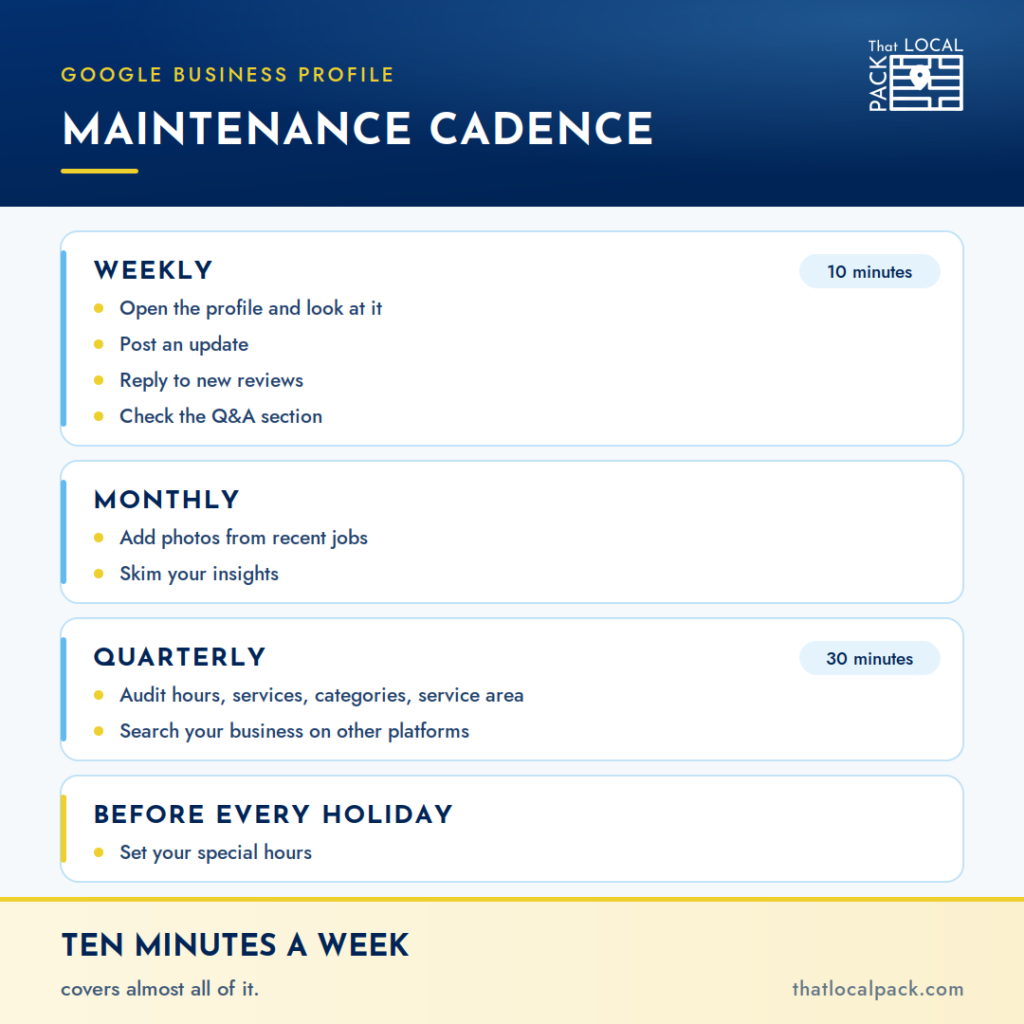
Weekly, ten minutes: open the profile and look at it. Post an update. Check for new reviews and reply. Check the Q&A section for anything new.
Monthly: add photos from recent jobs. Skim your insights to see what people are searching to find you.
Quarterly, half an hour: audit hours, services, service descriptions, service area, categories and attributes. Search your business on the other platforms and fix anything wrong.
Before every holiday period: set your special hours. This is the single most common reason a customer turns up to a closed business and leaves a one-star review.
The mistakes I keep having to fix
These are the ones where the owner thought they were doing it right.
- Ignoring the profile for months at a stretch. Everything else on this list is downstream of this one.
- Choosing a primary category that sounds impressive rather than the one that describes the work.
- Collecting no reviews at all because asking feels awkward, then panicking when the first negative one arrives.
- Replying to nothing. A profile with twenty reviews and zero owner replies reads as absent.
- Letting the rest of the web drift. Old addresses, disconnected phone numbers, listings from a business name you stopped using.
- Treating a difficult customer as someone to beat. I have had to help businesses recover profiles after a dispute escalated and the other party retaliated through their listings. Not every difficult customer will do that. It only takes one who will.
Five things that are not maintenance problems
Everything above is work you can do yourself, and should. These are different. If one of these describes you, no amount of posting and photo-adding will resolve it.
- You got a notification that your profile is no longer visible to the public, and you did nothing. This is the most expensive item on the page. Warnings from Google do not resolve themselves, and delay is the single biggest factor in how hard these become to reverse.
- Your business name on Google has words in it that are not on your signage or your registration. Keyword-stuffed names work until they do not, and then they take the profile with them.
- Your listed address is a PO Box, a mailbox service, a virtual office or a registered agent. That is one of the things Google is specifically looking for.
- You are not sure whether you are a service area business, a storefront, or a hybrid. These play by different rules, and most published advice is written for storefronts. Getting this wrong is a common cause of failed verification.
- You have no verification documentation ready. If Google asks you to prove the business is real, you want your license, your proof of address and a video of the premises already in hand.
On that last one — do this tonight, whether or not anything is wrong. Record one continuous, unedited video on your phone: the street sign and building number, you unlocking the door, a walk through the workspace, your equipment with any branding visible, and something that ties the business to you. Save it somewhere you can find it. If you are ever asked to verify or to prove yourself after a suspension, you are not staging footage while your phone is not ringing.
Maintenance
Do this yourself.
- Set the right primary category
- Keep hours, services and descriptions current
- Watch for public edits to your info
- Collect reviews continuously
- Reply to every review
- Post updates and add your own photos
- Keep your NAP consistent everywhere
Warning signs
Stop and get a read on it.
- A Google warning you haven't acted on
- Keywords in your business name
- A PO Box or virtual office address
- Unsure if you're service area, storefront, or hybrid
- No verification documents ready
None of these is a maintenance problem. No amount of posting fixes them.
Run the free risk checkIf any of the five above applies to you, run the profile risk check. Two minutes, no email required, and it will tell you whether what you have is fixable or structural.
When to stop doing this yourself
Most owner-operators should manage their own profile. The maintenance above is genuinely not hard, and paying someone to post photos is a poor use of money.
There are a handful of points where that stops being true:
- Your listings across the web need a full rework. Not one wrong phone number — years of accumulated old names, old addresses, duplicate entries and platforms you forgot existed. That is a project, not a chore.
- You have done the work, the profile is genuinely in good shape, and you are still buried. If the profile is right and the results are not there, the problem is somewhere else. Finding out where is a different job than maintaining a profile.
- You have been through a suspension you did not deserve and never want to repeat it. Perfectly reasonable. Some people want that risk to be somebody else's to watch.
- You are adding locations, each with its own service area. Multiple profiles with overlapping or badly drawn service areas is where owner-managed setups usually come apart.
- What you actually need is a whole web presence. A site, content, visibility in AI answers as well as search — at that point the profile is one piece of a larger plan rather than a standalone job. Pricing for that is here.
If none of those apply, keep doing it yourself. Ten minutes a week is a better return than most of what you could spend that money on.